
Few things can bring a child’s excitement to a screeching halt faster than an RC car that suddenly refuses to cooperate. One moment, they’re expertly navigating obstacles, the next, their beloved vehicle is stuck, unable to back up. The inability to go in reverse isn’t just frustrating; it can completely derail playtime and puzzle even experienced enthusiasts. For parents, it often means trying to decipher a technical issue while a hopeful child looks on.
The good news is that an RC car failing to go in reverse, while seemingly complex, often points to a few common culprits. These typically involve issues with the power supply, signal communication, the motor’s integrity, or, most frequently, the electronic speed controller (ESC) settings. While frustrating, this common problem is usually resolvable with systematic troubleshooting. This comprehensive guide will transform a potential setback into a valuable learning experience for both you and your child, empowering you to diagnose and fix the issue, and get that RC car reversing again.
Understanding the Heart of Your RC Car’s Movement
Before diving into troubleshooting, it helps to understand the basic components that allow your RC car to move, especially in reverse. This foundational knowledge will make the diagnostic process much clearer:
- Transmitter (Remote Control): This is your control hub. It sends signals to the car’s receiver, telling it what to do (go forward, turn, brake, reverse).
- Receiver: Located in the RC car, this component catches the signals from the transmitter and translates them into commands for the ESC and steering servo.
- Electronic Speed Controller (ESC): Often considered the brain of the RC car’s drivetrain, the ESC takes commands from the receiver and regulates the power delivered to the motor. It controls speed, direction (forward/reverse), and braking. Modern ESCs are sophisticated, with programmable settings.
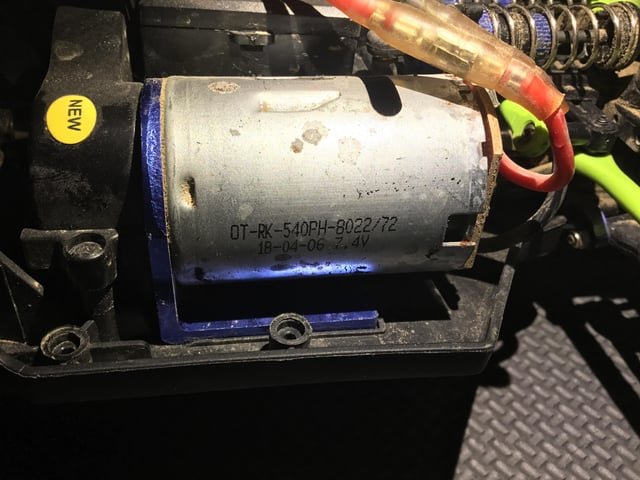
- Motor: The muscle of the operation. It converts electrical energy from the battery (via the ESC) into mechanical motion, spinning the wheels.
- Battery: Powers the entire system, from the ESC and motor to the receiver and steering servo.
When you command your RC car to reverse, the signal travels from the transmitter to the receiver, then to the ESC, which then tells the motor to spin in the opposite direction. A breakdown at any point in this chain can prevent reverse motion.
Initial Checks: The Simple Solutions First
Before you start disassembling your RC car, begin with the easiest and most common fixes. Many issues can be resolved with a quick check of these fundamentals:
1. Check Both Batteries: The Power Lifeline
This might seem obvious, but it’s astonishing how often a low or depleted battery is the root cause of seemingly complex problems. RC cars, particularly their ESCs, often prioritize forward motion when power is low, sometimes disabling reverse to conserve energy or prevent damage.
- RC Car Battery:
- Is it fully charged? Even if it seems to have some juice for forward motion, reverse often requires a bit more consistent power.
- Is it properly connected? Ensure the battery is securely plugged into the ESC. A loose connection can cause intermittent power delivery.
- Is it damaged or old? Over time, batteries lose their capacity. If your battery is old, swollen, or visibly damaged, it might not be providing enough stable voltage.
- Transmitter (Remote) Batteries:
- Are they fresh? Just like the car’s battery, weak transmitter batteries can lead to inconsistent or lost signals, affecting specific functions like reverse. Replace them if in doubt.
- Are they inserted correctly? Double-check polarity.
2. Inspect All Connections: The Unseen Culprits
Vibrations, bumps, and general wear and tear can cause wires to become loose or damaged. A poor connection can disrupt the flow of power or signal.
- ESC to Motor Wires: Ensure these are firmly connected. For brushed motors, check the two wires. For brushless motors, check all three phase wires and the smaller sensor wire (if applicable).
- ESC to Receiver Wire: This small cable carries the control signal from the receiver to the ESC. Make sure it’s securely plugged into the correct channel on the receiver (usually channel 2 for throttle).
- Battery Connectors: Check for any signs of corrosion, bent pins, or loose housing on both the battery and ESC connectors.
Delving Deeper: The Electronic Speed Controller (ESC)
The ESC is the most common source of reverse issues. Its settings and calibration are critical for proper directional control.
3. ESC Calibration: Teaching Your Car Its Limits
The ESC needs to “learn” the full range of your transmitter’s throttle input. If it’s not properly calibrated, it might not recognize the “reverse” signal, or it might interpret it as “brake.”
- How to Calibrate:
- Turn on your transmitter first.
- Press and hold the ESC’s setup button (or follow specific manufacturer instructions – consult your manual!).
- Turn on the RC car.
- Release the setup button when prompted (usually by a specific LED flash or beep sequence).
- Follow the prompts: Hold full throttle, then full brake/reverse, then neutral.
- Turn off the car, then the transmitter, and restart.
- Why it helps: This process ensures the ESC correctly understands where your transmitter’s throttle stick is for full forward, full reverse, and neutral. A miscalibration is a very common reason for reverse not working.
4. ESC Mode Settings: Is Reverse Even Enabled?
Many ESCs, especially those designed for racing, have different operating modes. Some modes intentionally disable reverse.
- Forward/Brake Only Mode: This mode is common in competitive racing to prevent accidental reverse movements that could damage the track or other vehicles. If your ESC is in this mode, reverse will be disabled.
- Forward/Brake/Reverse Mode: This is the standard mode for general bashing and recreational driving. You need to ensure your ESC is set to this mode.
- Changing Modes: This usually involves a sequence of button presses on the ESC itself, or sometimes requires a programming card or a computer interface. Refer to your ESC’s manual for precise instructions. This is a crucial step!
5. Thermal Shutdown: When Your ESC Gets Too Hot
ESCs are designed with thermal protection. If the ESC (or sometimes the motor) overheats due to strenuous use, poor ventilation, or an overloaded system, it may temporarily shut down certain functions, including reverse, to prevent permanent damage.
- Symptoms: Car might stop or lose power, and the ESC will be very hot to the touch.
- Solution: Let the car cool down completely. Ensure there’s adequate airflow around the ESC. Check for binding in the drivetrain or motor issues that might be causing excessive heat.
6. Water Damage or Physical Impact to the ESC
Even “waterproof” ESCs have limits. If water has entered the unit, or if the ESC has sustained a hard impact, internal components can be damaged, leading to erratic behavior or loss of specific functions like reverse.
- Symptoms: Intermittent issues, strange smells, visible corrosion, or complete failure.
- Solution: If you suspect water damage, immediately disconnect the battery and let the ESC dry thoroughly. If physical damage is evident, the ESC may need replacement.
Troubleshooting the Motor and Drivetrain
While less common for *only* reverse to fail, motor or drivetrain issues can sometimes manifest this way.
7. Motor Issues: Brushed vs. Brushless
The motor is responsible for turning the wheels. If it has a problem, it might struggle with reverse.
- Brushed Motors:
- Worn Brushes: Brushes make contact with the commutator to deliver power. If they are heavily worn or stuck, the motor might struggle to operate in one direction, or both. Check the brushes for wear and replace if necessary.
- Commutator Condition: A dirty or grooved commutator can impede brush contact.
- Motor Wiring: Check the two wires connecting the motor to the ESC for any damage or loose solder joints.
- Brushless Motors:
- Sensor Wire (if sensored motor): Brushless motors can be sensored or sensorless. Sensored motors use a small sensor wire to provide precise rotor position feedback to the ESC. If this wire is damaged or disconnected, it can cause erratic behavior, including issues with reverse.
- Phase Wires: Ensure the three main wires from the ESC to the motor are securely connected and undamaged.
- Internal Damage: Less common, but internal damage to the motor could affect directional control.
8. Drivetrain Obstructions: Something’s Blocking the Way
Sometimes, the simplest explanation is the correct one. Debris, tangled string, or even a small stone can jam gears or axles, preventing the wheels from turning freely, especially in reverse where torque might be lower or the obstruction is positioned differently.
- Check Gears: Inspect the pinion gear (on the motor shaft) and the spur gear (main gear) for damage, missing teeth, or foreign objects.
- Axles and Wheel Hubs: Ensure nothing is wrapped around the axles or stuck in the wheel hubs. Spin each wheel by hand to feel for resistance.
- Bearing Issues: Worn or seized bearings can cause excessive drag, potentially preventing reverse motion.
Signal Communication and Transmitter Settings
The link between your hands and the car is crucial. Problems here can easily disrupt specific functions.
9. Transmitter Settings: The Control Panel
Your remote control has various settings that can impact throttle response and direction.
- Throttle Trim: This adjusts the neutral point of your throttle. If the trim is significantly off, the ESC might not register a true neutral, and therefore not properly engage reverse. Adjust the trim until the wheels are stationary at neutral throttle.
- Throttle Dual Rate (D/R) or End Point Adjustment (EPA): These settings adjust the maximum throw of your throttle channel. If the EPA for reverse is set too low, the ESC might not receive a strong enough “reverse” signal. Ensure these are set to 100% or as recommended by your manual.
- Reverse Switch/Function: Some older or more basic transmitters might have a physical switch or a menu option to reverse the throttle channel. Ensure this is set correctly for your ESC.
10. Receiver Issues and Binding
The receiver’s job is to interpret signals. If it’s not doing its job correctly, or if its connection to the transmitter is weak, problems arise.
- Binding: The transmitter and receiver need to be “bound” (paired) to each other. If the binding is lost or unstable, control can be erratic. Re-bind your transmitter and receiver according to your RC car’s manual.
- Antenna: Ensure the receiver’s antenna is not cut, damaged, or tucked away in a way that significantly reduces signal strength.
- Receiver Damage: Like the ESC, the receiver can be damaged by water or impact, leading to partial or complete loss of function.
11. Radio Interference
While less common with modern 2.4GHz systems, interference from other radio devices, Wi-Fi, or even large metal objects can sometimes disrupt signals, causing intermittent or lost control, including reverse.
- Test in a different location: Try running your RC car in a different area to rule out local interference.
When to Seek Professional Help or Consider Replacement
While many issues can be resolved at home, there are times when it’s best to consult an expert or consider replacing a component.
- Visible Damage: If you see burnt components, swollen capacitors on the ESC, or severely corroded circuit boards, replacement is usually the only option.
- Persistent Issues: If you’ve systematically gone through all troubleshooting steps and the problem persists, it indicates a deeper internal fault.
- Lack of Tools or Expertise: Some repairs (like soldering new motor wires or disassembling complex gearboxes) require specific tools and a certain level of skill. Don’t risk further damage if you’re unsure.
- Cost-Benefit Analysis: Sometimes, the cost of a new ESC or motor is comparable to professional repair fees, and a new component offers reliability.
Preventative Maintenance: Keeping Reverse in Play
A little proactive care can prevent many of these frustrating issues.
- Regular Cleaning: Keep your RC car free of dirt, dust, and debris, especially around gears, bearings, and electronics.
- Battery Care: Always store and charge batteries according to manufacturer instructions. Don’t over-discharge LiPo batteries.
- Inspect Connections: Periodically check all wires and connectors for tightness and damage.
- Read Your Manuals: Your RC car and ESC manuals contain invaluable information on settings, calibration, and maintenance specific to your model.
- Gentle Driving: While RC cars are built for fun, excessive abuse (crashing into walls repeatedly, submerging in water) can lead to component failure.
Troubleshooting Checklist Table
Here’s a quick reference table to guide your troubleshooting process:
| Problem Area | Specific Issue | Action to Take |
|---|---|---|
| Power | Low Car Battery | Fully charge the car battery. Check battery health. |
| Low Transmitter Battery | Replace or recharge transmitter batteries. | |
| Loose Battery Connection | Ensure car battery is securely plugged into ESC. | |
| ESC | Incorrect Calibration | Re-calibrate the ESC to your transmitter’s throttle range (refer to manual). |
| Reverse Disabled Mode | Change ESC mode to “Forward/Brake/Reverse” using ESC button or programming card. | |
| Overheating ESC | Let the car cool down. Check for obstructions or gear binding. | |
| ESC Damage (Water/Impact) | Inspect for visible damage. Dry thoroughly if wet. May require replacement. | |
| Motor | Worn Brushed Motor Brushes | Inspect brushes for wear; replace if necessary. |
| Loose Motor Wires | Ensure all motor wires are securely connected to the ESC. | |
| Sensored Motor Sensor Wire | Check for damage or disconnections of the small sensor wire. | |
| Drivetrain | Physical Obstruction | Inspect gears, axles, and wheels for debris, hair, or damage. |
| Binding Drivetrain | Check for stiff movement in gears or bearings; clean and lubricate if needed. | |
| Signal | Transmitter Throttle Trim | Adjust throttle trim to ensure neutral is truly neutral. |
| Transmitter EPA/D/R | Ensure reverse End Point Adjustment or Dual Rate is set to 100%. | |
| Lost Binding | Re-bind your transmitter and receiver. | |
| Receiver Antenna Damage | Inspect antenna for cuts or severe kinks. |
Frequently Asked Questions (FAQs)
Q1: Is it common for RC cars to lose their reverse function?
A: Yes, it’s a relatively common issue. The ESC’s programming and calibration are frequent culprits, as are battery issues. It’s often one of the first specific functions to be affected when there’s a power or signal problem.
Q2: Can a beginner parent fix an RC car that won’t go in reverse?
A: Absolutely! Many of the solutions, such as checking batteries, recalibrating the ESC, or adjusting transmitter settings, are straightforward and don’t require advanced technical skills or specialized tools. This guide is designed to empower beginners to tackle these common problems.
Q3: What tools will I typically need for these troubleshooting steps?
A: For most common issues, you’ll primarily need basic tools like a small Phillips head screwdriver, possibly a small flathead, and potentially an Allen wrench set (hex drivers) if your car uses hex screws. A multimeter can be helpful for checking battery voltage, but isn’t strictly necessary for initial checks.
Q4: How do I know if my ESC is truly broken and needs replacing?
A: If you’ve systematically tried all calibration, mode changes, and connection checks, and the problem persists, look for visible signs of damage: burnt smell, swollen components, or visible corrosion. If the ESC isn’t responding at all, or only partially, despite adequate power and correct signals, it’s likely faulty. Consulting your car’s manual or an RC hobby shop can help confirm a diagnosis.
Q5: My RC car is brand new and reverse isn’t working. What should I do?
A: For a brand new car, the most likely culprits are often incorrect ESC calibration, the ESC being in a “forward-only” mode (common for competition-ready models), or a simple oversight like uncharged batteries. Follow the calibration and mode-setting steps carefully from your manual first. If the problem persists after checking all connections and batteries, contact the retailer or manufacturer’s support, as it may be a warranty issue.
Conclusion: Empowering Playtime and Learning
An RC car refusing to go in reverse can be a frustrating roadblock to fun, but it’s also an incredible opportunity for learning and bonding. By systematically troubleshooting the potential issues – from simple battery checks to understanding ESC settings – you’re not just fixing a toy; you’re teaching valuable problem-solving skills and patience. Remember, every RC enthusiast, regardless of age, encounters these challenges. The satisfaction of diagnosing and fixing the problem yourself, and then seeing that RC car back up flawlessly, is a rewarding experience.
So, take a deep breath, grab your manual, and approach this challenge with confidence. You’ll not only get the RC car reversing again but also deepen your understanding of this engaging hobby, making future playtime even more enjoyable for the entire family. Happy reversing!