
You can fix common rc helicopter charging problems by checking the battery connections, ensuring the power supply is active, and confirming the charger mode matches your specific battery type. If your battery isn’t holding a charge, it’s often due to a damaged cell or a deep discharge below its safe operating voltage. Always use the charger provided by the manufacturer to avoid damage to your equipment. If the battery feels hot or appears swollen, stop charging immediately to prevent fire risks.
Why your helicopter has charging problems
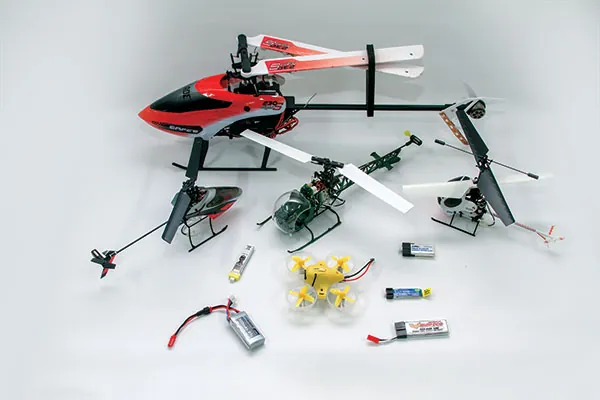
Most issues with flight time or charging stem from the chemical state of the lithium-polymer cells inside your aircraft. These batteries are sensitive to voltage levels and can become unstable if they drop too low. If you suspect a voltage issue, have a qualified technician inspect the battery.
Another frequent cause is physical damage to the charging cable or the balancing plug. These connectors are small and fragile, and they often develop internal breaks that you can’t see from the outside. If the charger doesn’t detect the battery, it’s usually because the connection to the balance port is loose or the pins are bent. You should always inspect your plugs for signs of corrosion or debris before starting the process.
Finally, user error regarding charger settings is a major factor. If you’re using a programmable smart charger, you must select the correct cell count and chemistry. Choosing a “fast charge” setting or the wrong voltage can cause the internal protection circuit to trigger, stopping the flow of power.
Check the cable and power source
If your charger isn’t showing any lights, start by verifying that your power source is actually live. Many people plug their chargers into wall adapters that are controlled by a light switch or a power strip that’s turned off. Try plugging the adapter into a different wall outlet that you know works with other devices. If the charger light stays off, the internal fuse or the power brick itself has likely failed.
Next, examine the charging lead for any visible nicks or exposed wires. If you notice any damage, don’t attempt to repair the wire yourself, as a short circuit in a lithium battery can cause an immediate fire.
Replace the entire charging cable with a genuine part from your helicopter manufacturer. If the cable looks fine, gently wiggle the connector where it meets the battery balance port while the charger is plugged in. If the lights flicker during this movement, the port on your battery is likely damaged.
This step is for those using standard wall-powered chargers. If you’re using a high-end field charger, ensure the input voltage matches the requirements of your power supply. A mismatch here will cause the unit to shut down to protect its internal circuitry. If you’re unsure about the specific requirements for your gear, check the manual that came with the helicopter.
Inspect the battery cell voltage
If the charger detects the battery but refuses to start, the voltage of one or more cells is likely too low. Most modern smart chargers have safety features that prevent them from charging a battery that is “dead” to avoid overheating. Have a technician test the cells to confirm if the battery is damaged.
This check is vital because people often mistake a “dead” battery for a broken charger. If your battery checker shows no voltage on all cells, the internal protection board in the battery has likely tripped or failed. Have a technician verify the cell voltage to determine if the issue is the battery or the charger.
If you find that one cell is significantly lower than the others, your battery is unbalanced. Some chargers have a “balance” mode that can fix minor differences, but significant imbalances indicate the battery is no longer safe for flight. Have a technician evaluate the pack to avoid a crash.
Reset your charger settings
Sometimes the problem is simply a setting that was changed by mistake during the last session. Ensure your charger is set to “Charge” mode rather than “Storage” or “Discharge,” as the latter modes stop early to maintain specific voltage levels. If settings are correct but charging fails, consult a technician.
Check the rating on your charger settings to ensure you’re using the correct current for your battery capacity. Charging at a higher rate than the battery’s rating can cause the cells to puff up or vent. If you’re unsure about the correct settings, have a technician assist you.
This isn’t for users who have limited experience with electronic equipment. If you aren’t comfortable adjusting these settings, stick to the simple “plug and play” USB chargers that come with most beginner-level helicopters. These chargers have no settings to change, which removes the risk of selecting the wrong current. If your charger has no buttons or screens, it’s likely a simple balance charger that detects the cell count automatically.
Avoid common charging mistakes
- Charging a battery while it’s still warm from a flight will degrade the internal chemistry and shorten the lifespan of the cells.
- Leaving batteries unattended during the process is a major risk, as even small defects can lead to a fire if a cell fails during the cycle.
- Storing batteries at full charge for long periods causes them to puff, so always use a storage mode if you won’t fly for more than 48 hours.
- Using a charger meant for a different brand of helicopter can lead to incorrect voltage detection, which can cause the battery to overcharge and catch fire.
- Connecting the leads with reverse polarity will instantly blow the internal fuse of most chargers, rendering them useless for future attempts.
Use the correct storage methods
| If you’re doing this | Do this instead | Why |
|---|---|---|
| Charging immediately after flight | Let the battery cool for 20 minutes | High heat damages the internal separators |
| Storing batteries fully charged | Keep them at 3.8 volts per cell | Prevents chemical breakdown and swelling |
| Leaving batteries in the aircraft | Disconnect them after every flight | Prevents slow drainage that ruins the cells |
| Storing in extreme temperatures | Keep them in a cool, dry place | Heat and cold significantly reduce battery life |
Related guides
Frequently asked questions
Can I use a car charger to charge my rc helicopter?
Only use a car charger specifically designed for your helicopter model or a power inverter providing stable AC power. Car outlets often provide fluctuating voltage that can damage delicate internal electronics. Use a dedicated field charger rated for 12V DC input if you must charge away from home.
How long does it take to charge a standard battery?
A standard lithium-polymer battery typically takes 45 to 90 minutes to charge fully. If your charger takes longer, the battery may have developed high internal resistance or the charger is failing. If a battery doesn’t finish within 2 hours, it’s likely failing and should be replaced.
Is it safe to charge a puffy battery?
Never charge a puffy battery, as swelling indicates dangerous internal gas buildup. A puffy battery is a fire hazard and must be retired from service immediately.
Why does my charger get very hot?
A charger should never be too hot to touch during operation. If it feels burning hot, it’s struggling to handle the current load or has a failing component. Stop the process immediately and unplug the device, as this indicates the charger or battery is nearing failure.
How do I know if my battery is dead?
Your battery is dead if the charger refuses to start because it can’t detect any voltage. Leaving a battery connected to the helicopter for several days often drains it below the threshold required for the charger to recover it. In this case, the battery can’t be fixed and must be replaced.
What happens if I overcharge the battery?
Overcharging a battery can cause the electrolyte to break down and produce flammable gases, leading to fire or explosion. While modern chargers have automatic cutoffs, these may fail if the device is faulty or settings are incorrect. Disconnect the battery immediately if it gets hot or expands.
Conclusion
Proper care for your equipment starts with consistent habits. If you monitor your cell voltages after every flight and store your batteries at the correct voltage, you’ll avoid most of these common power issues and ensure your helicopter is always ready to fly.