
To fix a non-responsive tree light remote, the first step in balsam hill remote control troubleshooting is to replace the batteries with fresh, high-quality alkaline cells. Most connection issues stem from low power or oxidized battery contacts rather than a broken receiver. If the remote still fails to trigger the lights after you install new batteries, the internal infrared or radio frequency signal is likely not reaching the control box.
Why your Balsam Hill remote control fails
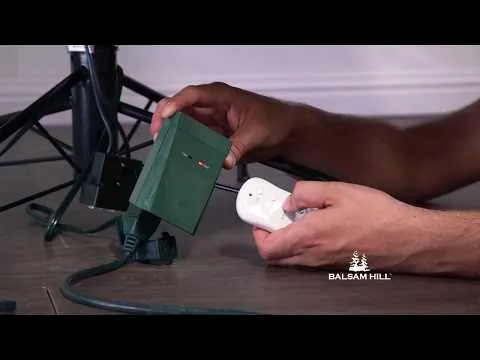
The primary reason a remote stops working is a loss of synchronization between the handheld unit and the receiver box located near the tree base. Interference from other electronic devices, such as Wi-Fi routers or smart home hubs, can sometimes block the signal. If your tree uses a radio frequency (RF) remote, physical obstructions like heavy furniture or metal objects between the remote and the tree can also weaken the signal strength.
Another frequent cause is a dirty or obstructed infrared (IR) sensor. If your specific model uses IR technology, the sensor on the tree’s control box must have a clear line of sight to the remote. Dust or holiday decorations covering the receiver window will prevent the signal from being received. You should check the receiver box for any debris.
Finally, the remote might have lost its pairing code if the power was recently interrupted. When you unplug the tree for a long period, the receiver sometimes resets to a default state that no longer recognizes the remote’s unique signal.
This is a common occurrence after storage, as the internal memory of the receiver can lose its “handshake” with the remote. If you’re unsure if your model has a pairing button, you can find the specific Balsam Hill product support documentation for your tree model to see if a manual reset is required.
Replace the batteries and clean contacts
When your remote stops responding, the first action is to swap the batteries. Use two new alkaline batteries of the exact size and voltage specified in your tree’s manual. Even if the old batteries seem to have a small amount of charge left, they may not provide enough power to transmit a strong signal to the receiver.
Take a moment to inspect the battery compartment for any white or green corrosion. If you see this, use a dry cotton swab to gently wipe the metal contact springs. If the metal looks dull, a light rub with a pencil eraser can remove the oxidation and improve the electrical connection. This is for users who have confirmed the battery door closes securely; if the door is loose, the batteries may shift and lose contact when you press the buttons.
After you replace the batteries, stand within three feet of the tree’s control box. Point the remote directly at the receiver window and press the power button firmly. If the lights don’t respond, try holding the button down for three seconds.
If the remote has an indicator light, watch to see if it blinks when you press a button. If the light doesn’t blink, the remote itself may have a faulty internal switch or a broken circuit board, which usually requires a replacement unit.
Resync the receiver and remote
If the batteries are fresh but the lights remain dark, you may need to re-pair the remote to the receiver. Many Balsam Hill trees feature a small “sync” or “learn” button on the side of the control box. To perform this, unplug the tree from the wall outlet, wait for thirty seconds, and plug it back in.
Immediately after plugging it in, press and hold the “sync” button on the control box while simultaneously pressing the power button on your remote. Hold both for five seconds. The tree lights should flash to indicate that they have accepted the new signal from the remote. This process varies slightly by model; some trees require you to hold the sync button for ten seconds until the lights blink twice.
This isn’t for users who can’t reach the control box easily or those who are uncomfortable working near electrical outlets. If you find the sync button is stuck or the control box is cracked, don’t attempt to open the housing.
Internal electrical components carry a risk of shock. In these cases, contact the manufacturer’s customer service department directly to order a replacement control box or remote. Avoid buying generic “universal” remotes, as they rarely support the specific frequency codes used by proprietary LED tree controllers.
Check for environmental interference
The effectiveness of your remote depends heavily on the placement of the tree and the control box. If the control box is tucked deep inside the branches or hidden behind a metal stand, the signal will struggle to penetrate these barriers. Move the control box to a position where it’s clearly visible from the room.
If you have other wireless devices nearby, they might be causing interference. Try turning off nearby smart speakers, Wi-Fi extenders, or cordless phone bases temporarily to see if the remote begins working. If the remote works only when you’re standing within two feet of the tree, it’s a sign that the signal is being drowned out by other radio frequencies.
Most consumer remotes operate on a 433 MHz frequency. If your smart home hub or a high-powered Wi-Fi router sits within three feet of the receiver, the background noise will overwhelm the remote’s weak signal. Move the receiver at least five feet away from any networking hardware to regain functionality.
If the remote works perfectly in one room but not another, the problem is environmental. You should keep the receiver box away from large metal objects, as these act as shields that block radio signals.
If you must keep the tree in a corner, try to keep the control box facing outward toward the center of the room rather than toward the wall. A simple line-of-sight test is the best way to confirm this. If the remote functions only when pointed directly at the receiver, you have a signal strength issue.
Mistakes that cause signal failure
Using rechargeable batteries often provides a lower voltage than standard alkaline cells. This subtle drop prevents the remote from sending a strong enough pulse to the receiver, leading to intermittent signal failures. Always check the battery casing for a 1.5V rating; if it reads 1.2V, swap them for fresh alkaline batteries before troubleshooting further.
Mixing old and new batteries creates uneven power distribution, which can cause the device to function poorly or not at all.
Blocking the receiver window is a common oversight. Ornaments or thick branch tips placed directly over the infrared sensor physically obstruct the beam. If your lights fail to respond, clear a direct line of sight between the remote and the sensor.
If the tree is plugged into a wall switch that’s turned off, no amount of remote troubleshooting will work. Always verify the physical power source first.
Finally, rapid clicking confuses the receiver’s processor. Press each button once and wait one full second for the system to respond.
Keep your remote working reliably
| If you’re doing this | Do this instead | Why |
|---|---|---|
| Leaving batteries in all year | Remove batteries before storage | Prevents acid leaks during summer |
| Using generic batteries | Use name-brand alkaline batteries | Ensures steady, consistent voltage |
| Hiding the control box | Place it in clear sight | Allows the signal to reach the sensor |
| Pressing buttons repeatedly | Press once and wait | Prevents the receiver from crashing |
To keep your remote functioning well, always remove the batteries before you pack the tree away for the season. Battery leaks are the number one cause of permanent remote failure.
When you set the tree up next year, use a fresh pair of batteries immediately to ensure the pairing process succeeds on the first try. If the remote fails to respond, check the infrared sensor on the control box for dust or debris. A simple wipe with a dry microfiber cloth often restores connectivity.
If your remote uses a CR2032 coin cell, replace the battery based on your usage patterns. Consult your owner’s manual for specific maintenance guidance, as the ideal replacement frequency depends on how often you operate the device.
Frequently asked questions
How long do the batteries in my remote usually last?
Tree remote batteries typically last for one full holiday season of intermittent use. If you leave your lights on for more than 12 hours daily, you may need to replace them sooner.
Why do my lights flicker when I use the remote?
Flickering usually indicates a loose connection at the tree base or an unstable signal. Check that the plug connecting the tree sections is pushed in all the way to ensure a secure connection.
Can I use a universal remote for my tree?
No, you can’t use a standard universal TV remote for your tree. Balsam Hill remotes use proprietary frequencies specifically coded for their control boxes, making universal remotes incompatible.
What happens if I lose the remote entirely?
You can purchase a replacement remote from the manufacturer’s website by searching for your specific tree model number. This number is typically printed on a tag near the plug at the base of the tree.
Is it safe to leave the tree plugged in?
It’s safe to leave the tree plugged in during the holiday season, but you should turn it off when leaving the house or sleeping. Using the remote doesn’t physically disconnect power from the wall.
Conclusion
If these simple fixes don’t get your lights glowing, don’t worry. Reach out to the company’s support team through their website with your order details handy. They’re usually quick to help, and they’ll make sure you aren’t left in the dark during the busy holiday season.